Blog Create
Faceless content: how to post videos without showing your face
Faceless content lets you post videos without appearing on screen. The formats that work, and how an AI creator opens new possibilities.
Published · 7 min read · By the Glimmry team
In short
Faceless content means videos posted without their author appearing on screen: a voiceover, hands, screen recordings, text, a pet or a character. An AI creator, human or animal, puts a face and a voice on screen without you having to show yours.
Here are the formats that work, what each one takes, and how Glimmry, the brand campaign app, lets you make a 15-second vertical video with no camera and no shoot.
What is faceless content?
“Faceless” describes any account or video whose author stays off camera. The message travels through something else: a voice, gestures, a screen, words, an object, an animal. The idea is old (think radio, or tutorials filmed over a desk), but short-form video platforms have made it hugely visible.
On TikTok, YouTube Shorts or Instagram Reels, the rule is the same as for any video: grab attention in the first second, then carry one idea to the end. A face helps, but a strong visual hook does the same job.
Why post without showing your face?
- Privacy: your family, your employer or your neighbours don’t need to recognize you.
- Comfort: not everyone enjoys filming themselves, and you don’t have to in order to create.
- Focus on the subject: the product, the tip or the story gets all the attention.
- Post more often: with no make-up, lighting or set, a video comes together faster.
Faceless doesn’t mean impersonal. The personality of the account comes from its choices: the tone of the lines, the situations it returns to, the way each video opens. Viewers follow a voice and a point of view as much as a face, so give your account a clear one from the very first post.
Which faceless formats work?
Voiceover on footage
You tell it, the images show it. It is the most flexible format, great for explainers, lists and stories.
Hands and objects
The camera films what you do: cooking, unboxing, tidying, drawing. The gesture does the talking, and viewers picture themselves doing it.
Screen recordings and screenshots
Perfect for presenting an app or a website: viewers see exactly what happens on screen. It is also the heart of Glimmry’s “App promo” angle, where the app’s real screenshot appears as is, in an iPhone frame, during the last shot.
Text on screen
One strong sentence, a few words at a time, and the video works even with the sound off.
A pet or a character
A cat, a dog or a character becomes the face of the account. This is where an AI creator really shines, and formats can be combined: in an app promo video, the character sets up the situation and the real screenshot closes it.
How does an AI creator open new possibilities?
An AI UGC creator brings together what faceless formats keep apart: an expressive face, a voice, a setting and a little story, all without you appearing. With Glimmry, you have three options:
- A fictional person
- built trait by trait: starting face, skin tone, age, hairstyle, eyes, style, filming location
- An animal
- a cat (12 breeds), a dog (14 breeds), a rabbit, a fox, a panda, or any animal described in text or from a photo of your pet
- Your AI version
- a middle ground: your face on screen, without ever filming yourself
Good to know: animals never talk on camera. Their lines are spoken by an inner voice off screen, which gives pet videos a very natural feel. And if you’d rather keep your own face, our guide on how to create an AI version of yourself walks you through it.
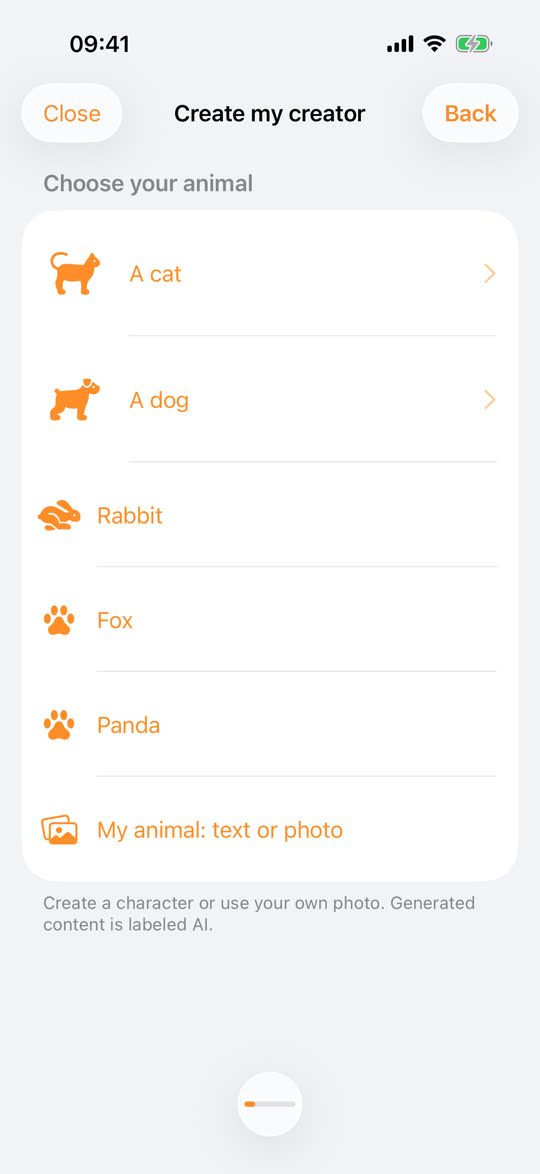
The character keeps the same identity from one video to the next thanks to its private 16-view reference sheet. Your faceless account gets a recurring face that your audience learns to recognize.
A faceless video in five steps
- Create your character: the app suggests 4 portraits in about a minute, and you keep one and name it.
- On its page, tap “Create content” and pick an angle: Fun, UGC, App promo, Product, Storytelling or Custom.
- Pick a hook from the library of 100, or let “Find me an idea” make suggestions. Add an image if you like: a product, an iPhone screenshot or a setting.
- Read the script: 3 scenes of 5 seconds, 32 words at most, in English. Edit anything you want.
- Tap “Create video”: the voice, the 9:16 opening frame, then the 15-second vertical video in 720p are generated. You can close the app in the meantime.

The video comes with subtitles on by default (the exact script text, three words at most at a time), so it reads well with the sound off, a real plus for a faceless format.
For the best result
- Open on a strong image: a gesture, an unexpected object, an expression. Our method for writing a 15-second video helps you build that first second.
- Keep the same character: on a faceless account, it becomes your visual signature.
- Show the AI clearly: “AI‑GENERATED IMAGES” is already burned in, so add the platform’s AI label when you post. It is all explained in our guide on labeling sponsored AI videos.
- Look at campaigns: after your application is accepted, check each brief’s accepted creator types, rate and per-video cap in the app. The math is in CPM payouts explained.
Glimmry is in private beta on TestFlight for iPhone and iPad (iOS 17 or later), and generation is free there. To see the whole journey, head to how it works.
Frequently asked questions
Can you grow on TikTok without showing your face?
Yes, many accounts post without ever appearing on screen, using a voiceover, hands, screen recordings or a character. What holds attention is mostly the first second and one clear idea, not the author’s face.
Does an AI creator count as faceless content?
Yes, if you pick a fictional person or an animal: a face appears on screen, but it isn’t yours. On Glimmry, every video carries “AI‑GENERATED IMAGES” so your audience knows exactly what they are watching.
Do I need to record my own voice for a faceless video with Glimmry?
No, Glimmry generates the voice: each creator has one fixed voice that reads the script word for word, in English. For an animal, it is an inner voice off screen, because animals never talk on camera.
Find your next brand campaign
Choose a brief and a rate, prepare your video with the built-in studio, get it approved and earn from verified views.
Coming soon to the App Store